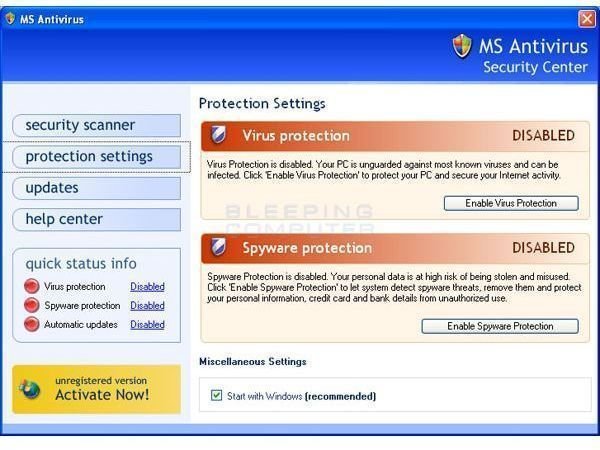
There’s a fake virus scanner out there called MS Antivirus 2008, and it will trick you into purchasing an upgraded version to remove viruses that you don’t really have.
MS Antivirus 2008
I recently had the pleasure of disinfecting a computer that had so much malware on it that the machine could no longer function. In addition to a barrage of typical pop-up windows, one interesting program I noticed on the machine was something called MS Antivirus 2008. It peaked my interest because it looked like a Microsoft program, but I knew that Microsoft doesn’t make anything called MS Antivirus 2008.
MS Antivirus 2008 is a very nasty bit of malware that fools the user into thinking it is a Microsoft product designed to protect your computer from viruses. It’s screens look just like a Microsoft product and on the surface it looks like a legitimate program. However, it is a fake virus scanner that gives you all kinds of false infection notices just to trick you into ‘activating’ the software, which means they want you to pay for it. After you buy the software, it will tell you that those viruses you never had to begin with have been removed. A variant of this program, called Vista Antivirus 2008, has also been spotted on the web. It’s the same piece of malware.
The primary means of infection for a program like this is through a web browser pop-up window disguised as a Windows system message. You typically find these types of pop-ups on unscrupulous sites filled with porn and other things. It concerned me that this was a work computer that had been infected, so I had to wonder what kind of stuff the user had been browsing on the web when the machine got infected.
What happens is you get a pop-up message telling you that your computer is infected with a virus or spyware. The message looks just like the kind of alert you might get in Windows, and it contains buttons asking you about getting rid of the virus. By clicking on the buttons and following the misleading instructions on screen, what you’re actually doing is installing this malware on your system. These things are designed to trick unknowing users into installing the software out of the fear that they have a virus.
MS Antivirus 2008
Once your computer is infected with the program, it can be a chore to remove. MS Antivirus 2008 does actually show up in Add/Remove Programs, but if you try to remove it the program will just go into ‘upgrade now’ mode and try to make you buy something, then it nails you with a bunch of warnings about fake viruses that your machine doesn’t really have. It’s a total scam and I feel sorry for anyone who actually plunked down money on this junk software.
The machine that had MS Antivirus 2008 on it actually had Symantec Antivirus installed, but it didn’t catch it. I installed Windows Defender and ran the latest definitions on it, but Defender had trouble getting rid of it, too. This machine had some other malware that was also causing problems, and Defender was able to clear off some of them. Ultimately, I found a free utility via BleepingComputer.com that removed the program. Had Defender been previously installed, it most likely would have kept MS Antivirus 2008 from getting on the computer.
It’s difficult to explain just what to look for with programs like this. For one, you probably shouldn’t be looking at the kind of websites that offer this type of thing, but that is your personal business. You definitely shouldn’t be looking at such sites at work. The most important thing when you get a suspicious virus or spyware alert is to close that window, then open up your own virus or spyware scanner and run a system scan. If you don’t have a virus or spyware scanner, you should get one immediately. Getting on the internet without any protective software is like a driving a car with the seatbelt unbuckled.
The Internet is rife with scam artists, thieves, and other crooks who use a variety of means to truck people out of their money. Programs like MS Antivirus 2008 are tools of their trade, and the best way to prevent yourself from being infected is to know what to look for and have the right software to protect your PC.